What is NameCheck?

NameCheck is a security tool that helps reduce the risk of paying the wrong account when making first-time payments in NetBank, the CommBank app or CommBiz. It checks the account details you enter against the payment details we have available. For example, if the account name doesn’t look right for that BSB and account number, we’ll ask you to double check before you proceed to help you ensure you’re paying the intended recipient.

What is NameCheck?

NameCheck is a security tool that helps reduce the risk of paying the wrong account when making first-time payments in NetBank, the CommBank app or CommBiz. It checks the account details you enter against the payment details we have available. For example, if the account name doesn’t look right for that BSB and account number, we’ll ask you to double check before you proceed to help you ensure you’re paying the intended recipient.

Why NameCheck?

  • NameCheck is designed to help protect you from false billing scams and reduce the risk of mistaken payments.

    An account name that doesn’t match the account details can be a warning sign of a false billing scam. Also known as a business email compromise, this type of scam occurs when a scammer hacks into a business’s email account and redirects legitimate payment requests or sends fake payment instructions.

    Alternatively, a mistaken payment can happen if you enter the wrong account details, by making a typo, or if you’ve been given incorrect information.

    Now, when you make a first-time payment in NetBank, the CommBank app or CommBiz, NameCheck checks the account details you enter for possible typos or signs of a scam. If something doesn’t look right, we’ll prompt you to review the details and confirm them with the intended recipient, helping reduce the risk of mistaken payments and false billing scams.

How does NameCheck work?

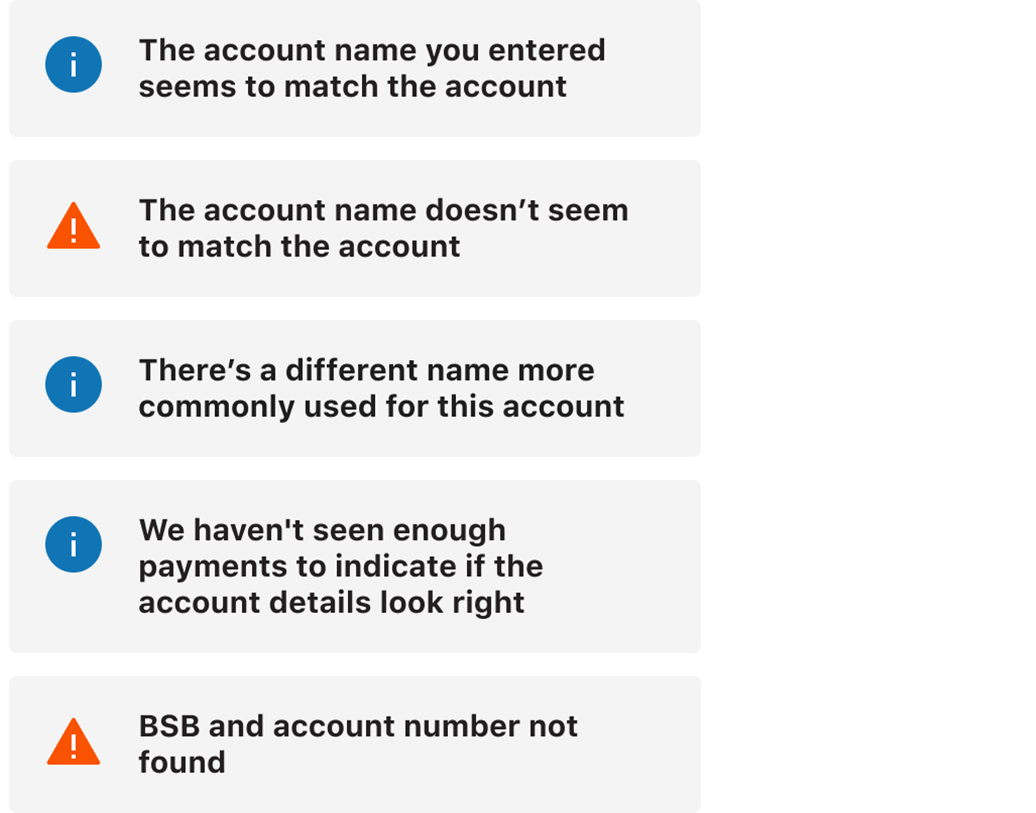
NameCheck uses advanced algorithms to review the account details you entered against our available payment information. It then shows one of the five following results to help you understand how likely it is that the account name you entered matches the name of the owner of that account.

The five possible results are: "The account name you entered seems to match the account", "warning: The account name doesn't seem to match the account", There's a different name more commonly used for this account", "We haven't seen enough payments to indicate if the account details look right", or "warning: BSB and account number not found"


Each result comes with an explanation along with prompts on what you should do next if things don’t look right. Keep in mind the results of NameCheck are based on our available payment information, which means we’re unable to confirm whether the name and account are an absolute match.

Frequently asked questions

CommBank customers can benefit from NameCheck, our security tool that works alongside Confirmation of Payee to help better protect our customers against scams and mistaken payments. Together, these tools provide additional information where possible, to help customers make safer payment decisions.

  • Confirmation of Payee uses New Payments Platform (NPP) infrastructure to check if the account name entered matches the name held by the receiving bank when sending a domestic payment using a BSB and account number.
  • NameCheck searches the account details entered for first-time payments in NetBank, the CommBank app or CommBiz. Using CommBank’s available payment data, NameCheck will then indicate whether the details look right, taking into additional account factors such as preferred names, nicknames, business trading names and potential risk indicators.

NameCheck reviews the account details you enter using our available payment information and provides an indication of how likely it is that the account name matches the account. You’ll then see one of five possible results.

If the results indicate that the account details don’t look right, we’ll prompt you to check the account details and speak with the intended recipient.

NameCheck will recognise some shortened or similar names that we’ve previously seen used for an account.

For example, if you enter ‘Jess’ instead of ‘Jessica’ as the account name, NameCheck will indicate that the name appears to match the account.

You’ll see NameCheck results after adding a new payee and checking their account details in NetBank, the CommBank app or CommBiz. NameCheck results are also shown when you make a first-time payment to a payee already saved in your address book.

No. NameCheck only applies to first-time payments made using a BSB and account number. A PayID already shows the actual name of the registered person or business.

No. NameCheck is based on our available payment information, which means we’re unable to confirm with absolute certainty that the name and account are an absolute match.

A name that doesn't match an account can be a sign of a scam. You should speak to the payee to check it's really them requesting the payment and double check the BSB and account number. It may also be a simple typo, so make sure the BSB and account number you’ve entered are correct.

We will resolve this issue by making an update to NameCheck soon. While it’s important to use exactly 6 digits for BSB numbers, any zeros at the start of an account number don’t make a difference when making payments. If you're confident you've entered the correct BSB and account number, rest assured the payment will go through regardless of how many zeros you include at the start of the account number, as long as the total length is 9 digits or less.

No. In CommBiz, NameCheck will review the bank account details of first-time payees for the following payment types:

  • Direct Credit (up to 50 payees)
  • Priority Payment
  • Fast Payment (using BSB & account number)
  • Manually imported file (Direct Credit payments up to 5,000 payees only)

More ways to stay safe

Create a strong password

Setting a strong, unique password and changing it regularly can help keep your accounts safe. Follow our password and PIN tips. 

Help keep your account secure

Find out what you can do to help keep your account and cards secure, from setting up alerts when your card is charged, to locking or cancelling your card in seconds.  

Stay up to date

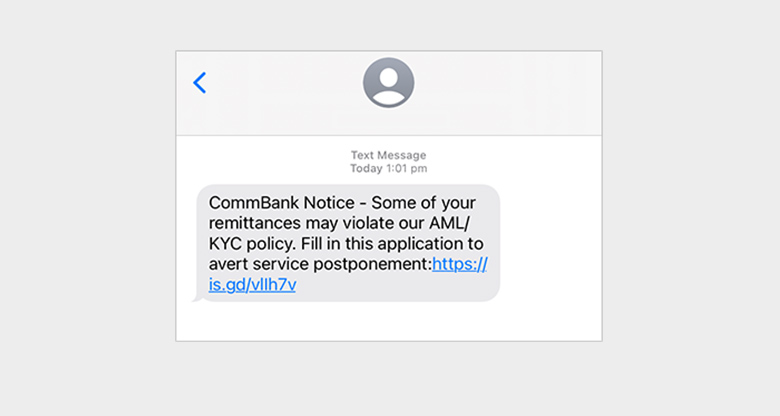
Unsure whether a message is legitimate? Check out our latest scam alerts before clicking anything.

Stop. Check. Reject.

Three simple steps to help protect yourself from scams.

  1. Stop
    Does a call, email, text or social media post seem off? Stop and take a breath so you can think clearly.
  2. Check
    Contact the organisation using contact details from their official website or app, or ask your friends or family.
  3. Reject
    If you're unsure, hang up on the caller and block the number, or delete the email or message.

If you've shared any personal or banking details, change your passwords immediately.