Help & support
Winner of Canstar’s Digital Banking - Bank of the Year Award for 17 years in a row.1
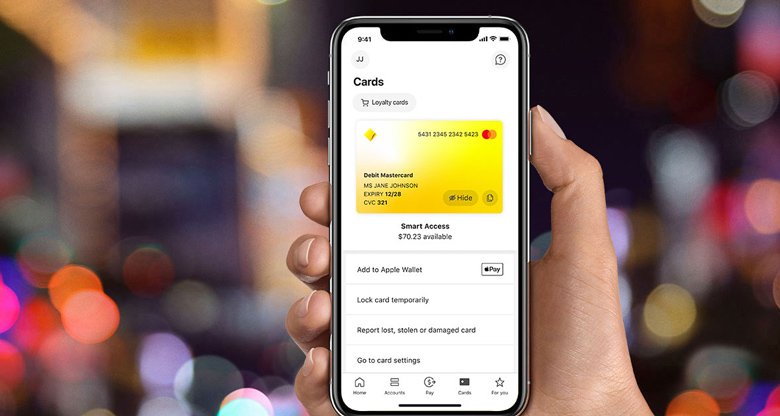
We want to help you stay safe. Control your Debit Mastercard with Lock, Block, Alert, and see scam information in your language.
If you need to finish your bank account set up, visit a branch. Make sure you bring:
Still waiting for your physical card? Start banking with just your phone today.
Send money to more than 200 countries, in 30+ currencies from the CommBank app, NetBank or in branch.3
To receive money from overseas, the sender will need:
Securely send and receive money in real-time2 using your mobile number or email address.
To get started, search ’PayID’ in the CommBank app, or visit Settings’ in NetBank.
Use your new BSB and account number to pay bills, send or receive money in the CommBank app or NetBank.
You can also:
CommBank Yello gives eligible customers access to special offers, discounts and offers from popular brands in Australia.
You can save on everyday things like shopping, mobile plans, home internet and other household services.
A Smart Access Account is a bank account for day-to-day spending. You can also open a joint account with someone else.
Explore our savings options, where you can earn interest to help grow your money.
Want to split your purchases into four payments? Explore CommBank StepPay to see if it’s right for you.
Check our criteria to see which visa types are eligible for our credit cards.
See PDS and TMD to decide if the product is right for you.
Visit our Making Australia Home hub to start your home buying journey.
Banking in Australia comes with new banking words and terminology you need to learn and understand. See our quick guide to banking in Australia and Australian banking terms glossary for more information.
First time payments and some transfers may take 24-48 hours for security reasons. Your account balances will update straight away in NetBank after you send money.
For international transfers, this can take longer based on the recipient’s country and bank.
For more details, check out our information about money transfers.
When you send money overseas using NetBank or the CommBank app, you will not pay a transfer fee (excludes AUD to AUD). We will also cover any fees charged by other banks in the transfer.
For more information on fees that apply to IMTs, see fees and charges.
You can find your statement in the app or in NetBank under your account.
For more information, check out info about online statements.
In the CommBank app:
In NetBank:
Some card transactions show up as pending in your account until they are fully processed. Usually, it takes around 3 to 5 business days, but sometimes it can be up to 10 days or longer.
When a transaction is pending, the amount is taken from your available funds, not your account balance. This means you can see payments or withdrawals straight away.
For more information, check out how pending transactions might affect your balance.
In Australia, cards, contactless payments and cardless payments (like digital cards and wallets) are generally widely accepted.
If you need cash, you can withdraw at a CommBank branch or ATM using your physical card or QR Cardless.
We offer a range of money management tools in the CommBank app. Find out more on money management
You can easily pay your bills (electricity, internet, phone and more) via BPAY in NetBank or the CommBank app.
BPAY (short for bill payment) is an Australian electronic bill payment system that allows users to pay bills securely through online or mobile banking.
When paying your bills, it is important to find the BPAY details on your bill. Look for the 'Biller Code', and 'Customer Reference Number'.
Home and car insurance help protect the things that matter to you, so it’s important you understand what makes up the policy and product you’re purchasing. Visit our glossary to understand some common terms you may come across.
Here’s how to raise a dispute:
Dispute online - for debit cards and credit cards, log on to the CommBank app or NetBank.
Message us in the CommBank app to quickly get connected to the right help. Don’t have the app? Download it now or contact us to raise a dispute.
How long will a dispute take?
After all pending transactions have been processed, a dispute can take:
How do I get updates on my dispute?
You will get updates from us via email, app notifications, and sometimes SMS throughout the process. Make sure your CommBank app notifications are turned on so you know when you have received a reply. Final outcomes are sent via email (or letter if you have opted in).
Learn more about getting a resolution
For unauthorised transaction disputes, we'll have to cancel and replace your card to protect your account from further unauthorised activity. But don’t worry, you’ll still be able to make purchases using your digital card found in the CommBank app while you wait for your new card to arrive.
For extra control and security, put a temporary lock6 on your debit card or credit card. Review your digital wallets and delete any cards you don’t recognise or no longer use. To do this, log on to the CommBank app, tap “Cards”, then “Card settings” and “Review digital wallets”.
Australia’s most popular banking app1
The target market for these products will be found within the product’s Target Market Determination.
For products issued by Hollard, information about the target market can be found within the product’s Target Market Determination.
This information has been prepared without considering your objectives, financial situation or needs. Before acting on this information, you should consider its appropriateness to your circumstances. Please view our Financial Services Guide (PDF). View full terms and conditions for transaction and savings accounts (PDF) or from any branch of the Commonwealth Bank.
The CommBank app is free to download however your mobile network provider charges you for accessing data on your phone. Find out about the minimum operating system requirements on the CommBank app. Terms and conditions are available in the app. NetBank access with NetCode SMS is required.
1 Awarded ‘Bank of the Year – Digital Banking’ for 2026 (for the 17th year in a row) by Canstar in May 2026.
2 For security reasons, a hold may apply on first time payments. The delay allows fraud security checks to take place and gives you time to alert us to unauthorised or suspicious activity on your account. Subsequent payments should be received in under a minute.
3 Fees and charges may apply. Fees must be paid in Australian Dollars or debited from an Australian Dollar account. For more information about fees and charges for international payments, read our Standard fees and charges for international payments and travel funds.
4 CommBank has an ownership interest in More. More and CommBank have entered into a strategic alliance agreement. More’s Terms and Conditions are available on the More website. For offer Terms & Conditions, visit CommBank More Mobile and CommBank More nbn®.
5 Home Insurance and Car Insurance are provided by Hollard Insurance Partners Limited ABN 96 067 524 216, AFSL 235030 (Hollard) and distributed by the Commonwealth Bank of Australia ABN 48 123 123 124, AFSL 234945 (CBA). Hollard is the insurer of these general insurance products. Hollard is not part of the CBA Group. CBA does not guarantee the obligations or performance of Hollard or the products Hollard offers. Neither CBA, nor any of its related bodies corporate accepts liability or guarantees payment of any claim or benefit in respect of these general insurance products issued by Hollard. CBA may be paid a commission if Hollard issues you with a Home and/or Car Insurance policy. Details are provided in the Financial Services Guide (FSG) by clicking on the link, or by calling 13 1361 for a paper copy.
For products issued by Hollard, information about the target market can be found within the product’s Target Market Determination.
Cover subject to eligibility criteria. Terms, conditions, limits and exclusions apply. Please read the relevant Product Disclosure Statement (PDS) and other important disclosure documents.
6 Cancelling your card or applying a temporary lock to your card won’t stop all transactions including digital wallet transactions (such as Apple Pay and Google Pay or CommBank Tap & Pay), some online transactions where the business has stored your card details, and any transaction not sent to us for authorisation (e.g. transactions processed when there’s a system interruption).